- Step 1
Register during the open window, not the trading window
Open Contests. The banner shows the next contest, its start date, and whether registration is open. Read the card: registration dates, the separate contest period dates, the demo account size, how many traders already joined (for example 2 / 100), and the prize for each rank.
Tap Join the contest. Your entry becomes “Registered — trading starts when the contest begins”. This costs nothing and does not touch My challenges or your wallet.
A full contest, or one where registration closed, will say so instead of showing the button.
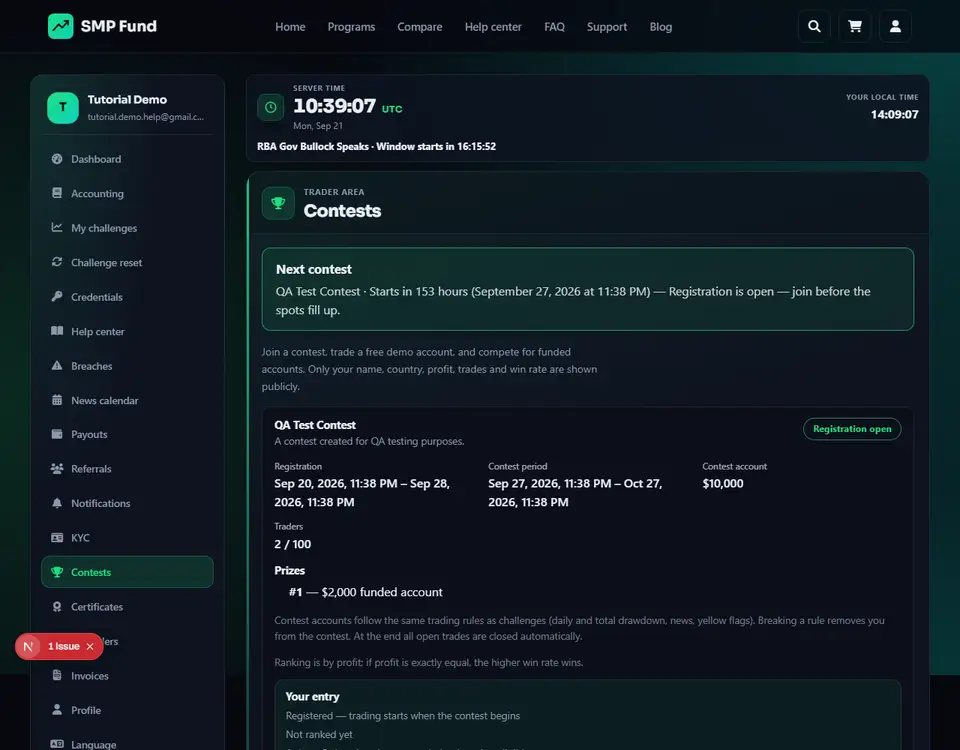
- 1Registration window
- 2Traders joined
Annotated screen - Step 2
During the contest: same rules, then check who won
Trading only starts once the contest period begins — the page then says your login is available, and the MetaTrader details land on Credentials like any other account.
Contest accounts follow the same engine as challenges: daily and total drawdown, news windows, and yellow/red flags in Breaches. Breaking a rule removes you from the contest.
To be prize-eligible you need at least the minimum number of closed trades shown on the contest card (5 by default). Ranking is by profit; if two traders tie exactly, the higher win rate wins. At the end of the contest period all open trades close automatically, so you do not need to close anything yourself before the deadline.
- 1Prize-eligible
Annotated screen
Help center
Contests: race a free demo account for a funded prize
Contests are optional and free — no purchase needed. Registration and the contest itself run on separate date windows. Login details for the contest account only appear once trading starts, and the standard drawdown, news, and breach rules still apply.





